
3. Cấu trúc sources
Cấu trúc Sources ERP Frappe
Kiến trúc hệ thống
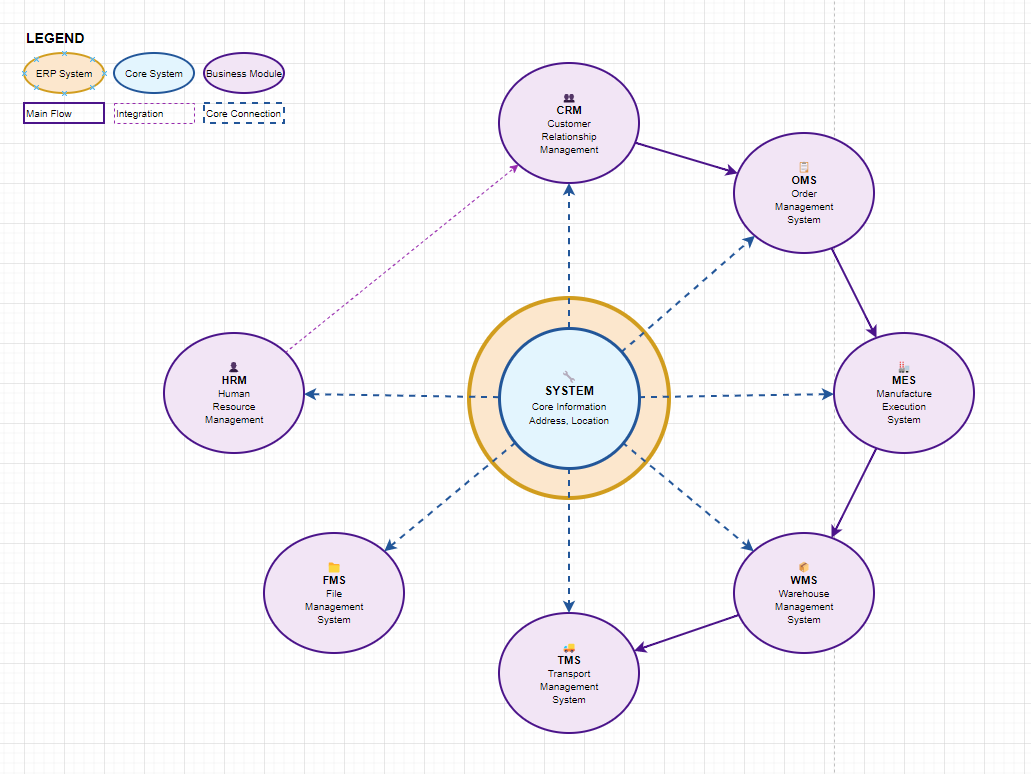
Áp dụng với frappe
Tài liệu tham khảo
Cấu trúc sources
frappe-bench/
├── apps/
│   ├── frappe/              # Core framework
│   ├── crm/                 # Customer Relationship Management
│   ├── oms/                 # Order Management System
│   ├── fms/                 # File Management System
│   ├── mes/                 # Manufacture Execution System
│   └── system/              # System management
├── sites/
│   └── [site-name]/
│       ├── private/
│       ├── public/
│       └── site_config.json
└── config/
Danh sách các App
1. CRM (Customer Relationship Management)
- Mô tả: Hệ thống quản lý quan hệ khách hàng
- Repository:
git@gitlab.itvina.com:sass/frappe_apps/crm.git - Chức năng: Quản lý khách hàng, cơ hội bán hàng, marketing
2. OMS (Order Management System)
- Mô tả: Hệ thống quản lý đơn hàng
- Repository:
git@gitlab.itvina.com:sass/frappe_apps/oms.git - Chức năng: Xử lý đơn hàng, theo dõi trạng thái, quản lý giao hàng
3. FMS (File Management System)
- Mô tả: Hệ thống quản lý tài liệu
- Repository:
git@gitlab.itvina.com:sass/frappe_apps/fms.git - Chức năng: Lưu trữ, phân loại và quản lý tài liệu
4. MES (Manufacture Execution System)
- Mô tả: Hệ thống điều hành sản xuất
- Repository:
git@gitlab.itvina.com:sass/frappe_apps/mes.git - Chức năng: Quản lý quy trình sản xuất, theo dõi tiến độ
5. System
- Mô tả: Hệ thống core và cấu hình
- Repository:
git@gitlab.itvina.com:sass/frappe_apps/system.git - Chức năng: Cấu hình hệ thống, quản lý người dùng, báo cáo
Tạo Site và Cài đặt App
1. Setup môi trường từ Repository
Quy trình Setup chuẩn:
# Bước 1: Clone repository tổng (chứa frappe-bench framework)
git clone git@gitlab.itvina.com:sass/havico.git frappe-bench
cd frappe-bench

# Bước 2: Kiểm tra cấu trúc ban đầu
ls apps/
# Expected output: frappe (chỉ có core framework)

# Bước 3: Lấy các app riêng lẻ vào bench
bench get-app git@gitlab.itvina.com:sass/frappe_apps/system.git
bench get-app git@gitlab.itvina.com:sass/frappe_apps/crm.git
bench get-app git@gitlab.itvina.com:sass/frappe_apps/oms.git
bench get-app git@gitlab.itvina.com:sass/frappe_apps/fms.git
bench get-app git@gitlab.itvina.com:sass/frappe_apps/mes.git

# Bước 4: Kiểm tra tất cả app đã được tải về
ls apps/
# Expected output: frappe system crm oms fms mes

# Bước 5: Xem thông tin version
bench version
Repository Structure:
git@gitlab.itvina.com:sass/havico.git (Repository tổng - Frappe Bench Framework)
├── apps/
│   └── frappe/              # Core framework only
├── sites/                   # Site configurations
├── config/                  # Bench configurations
├── env/                     # Python environment
├── logs/                    # Log files
└── bench.json              # Bench metadata

Individual App Repositories (Tái sử dụng được):
├── git@gitlab.itvina.com:sass/frappe_apps/system.git   # System management
├── git@gitlab.itvina.com:sass/frappe_apps/crm.git     # Customer management
├── git@gitlab.itvina.com:sass/frappe_apps/oms.git     # Order management
├── git@gitlab.itvina.com:sass/frappe_apps/fms.git     # File management
└── git@gitlab.itvina.com:sass/frappe_apps/mes.git     # Manufacturing
Tại sao thiết kế như vậy:
- Repository tổng: Chứa frappe-bench framework, cấu hình, môi trường
- App repositories riêng: Có thể tái sử dụng cho nhiều project khác nhau
- Flexibility: Có thể chọn app nào cần thiết cho từng project
- Maintainability: Update app độc lập, không ảnh hưởng bench framework
2. Kiểm tra App đã được tải về
# Liệt kê các app có sẵn trong bench
ls apps/
# Output: frappe crm oms fms mes system

# Hoặc sử dụng lệnh bench
bench --help | grep app
3. Tạo Site mặc định
# Tạo site với cấu hình mặc định
bench new-site havico.vn.local

# Cài đặt app vào site (theo thứ tự dependencies)
bench --site havico.vn.local install-app system
bench --site havico.vn.local install-app crm
bench --site havico.vn.local install-app oms
bench --site havico.vn.local install-app fms
bench --site havico.vn.local install-app mes
4. Tạo Site với thông tin Database tùy chỉnh
# Trước tiên cần lấy các app từ repository (nếu chưa có)
bench get-app git@gitlab.itvina.com:sass/frappe_apps/crm.git
bench get-app git@gitlab.itvina.com:sass/frappe_apps/oms.git
bench get-app git@gitlab.itvina.com:sass/frappe_apps/fms.git
bench get-app git@gitlab.itvina.com:sass/frappe_apps/mes.git
bench get-app git@gitlab.itvina.com:sass/frappe_apps/system.git

# Tạo site với DB config tùy chỉnh
bench new-site havico.vn.local \
  --db-host "host" \
  --db-port "port" \
  --db-name "db_name" \
  --db-user "user" \
  --db-password "password" \
  --mariadb-root-username "root_user" \
  --mariadb-root-password "root_password"

# Cài đặt app vào site
bench --site havico.vn.local install-app system
bench --site havico.vn.local install-app crm
bench --site havico.vn.local install-app oms
bench --site havico.vn.local install-app fms
bench --site havico.vn.local install-app mes
5. Kiểm tra App đã cài đặt
# Liệt kê các app đã cài đặt trên site
bench --site havico.vn.local list-apps

# Expected output:
# frappe
# system
# crm
# oms
# fms
# mes
6. Workflow hoàn chỉnh từ Repository tổng đến Production
Alternative - Sử dụng individual repositories:
# Bước 1: Lấy tất cả app từ repository
bench get-app git@gitlab.itvina.com:sass/frappe_apps/system.git
bench get-app git@gitlab.itvina.com:sass/frappe_apps/crm.git
bench get-app git@gitlab.itvina.com:sass/frappe_apps/oms.git
bench get-app git@gitlab.itvina.com:sass/frappe_apps/fms.git
bench get-app git@gitlab.itvina.com:sass/frappe_apps/mes.git

# Bước 2: Tạo site mới
bench new-site havico.vn.local

# Bước 3: Cài đặt app theo thứ tự dependencies
bench --site havico.vn.local install-app system    # Core system first
bench --site havico.vn.local install-app crm       # Customer management
bench --site havico.vn.local install-app oms       # Order management
bench --site havico.vn.local install-app fms       # File management
bench --site havico.vn.local install-app mes       # Manufacturing

# Bước 4: Kiểm tra cài đặt
bench --site havico.vn.local list-apps

# Bước 5: Migrate để đảm bảo database được cập nhật
bench --site havico.vn.local migrate

# Bước 6: Start development server
bench start
4. Cấu hình App theo Site
Khi tạo site, cần xác định app nào sẽ được cài đặt dựa trên nhu cầu:
| Loại Site | Apps cần thiết |
|---|---|
| Sales Site | frappe, crm, oms, system |
| Manufacturing Site | frappe, mes, oms, fms, system |
| Full ERP Site | frappe, crm, oms, fms, mes, system |
Development Guide
1. Tạo DocType và Custom Code
Khi tạo DocType, hệ thống sẽ tự động generate các file:
Ví dụ: DocType "Order" trong module "order" của app "oms"
apps/oms/oms/order/doctype/order/
├── order.py          # Python backend logic
├── order.js          # JavaScript frontend logic
├── order.json        # DocType configuration
└── __init__.py
Cấu trúc file chi tiết:
1. order.py - Backend Logic
import frappe
from frappe.model.document import Document

class Order(Document):
    def validate(self):
        """Validation logic before save"""
        pass

    def before_save(self):
        """Logic executed before saving"""
        pass

    def after_insert(self):
        """Logic executed after creating new record"""
        pass

    @frappe.whitelist()
    def custom_method(self):
        """Custom API method"""
        return {"status": "success"}
2. order.js - Frontend Logic
frappe.ui.form.on('Order', {
    // Form events
    refresh: function(frm) {
        // Logic when form loads
        if (frm.doc.status === 'Draft') {
            frm.add_custom_button(__('Submit'), function() {
                frm.call('custom_method');
            });
        }
    },

    onload: function(frm) {
        // Logic when form first loads
    },

    // Field events
    customer: function(frm) {
        // Logic when customer field changes
        if (frm.doc.customer) {
            frappe.call({
                method: 'oms.order.doctype.order.order.get_customer_details',
                args: {
                    customer: frm.doc.customer
                },
                callback: function(r) {
                    if (r.message) {
                        frm.set_value('customer_name', r.message.customer_name);
                    }
                }
            });
        }
    }
});
3. order.json - DocType Configuration
{
    "actions": [],
    "allow_rename": 1,
    "creation": "2024-01-01 00:00:00.000000",
    "doctype": "DocType",
    "engine": "InnoDB",
    "field_order": [
        "customer",
        "customer_name",
        "order_date",
        "status"
    ],
    "fields": [
        {
            "fieldname": "customer",
            "fieldtype": "Link",
            "label": "Customer",
            "options": "Customer",
            "reqd": 1
        },
        {
            "fieldname": "customer_name",
            "fieldtype": "Data",
            "label": "Customer Name",
            "read_only": 1
        }
    ],
    "links": [],
    "modified": "2024-01-01 00:00:00.000000",
    "name": "Order",
    "permissions": [
        {
            "create": 1,
            "delete": 1,
            "email": 1,
            "export": 1,
            "print": 1,
            "read": 1,
            "report": 1,
            "role": "Sales User",
            "share": 1,
            "write": 1
        }
    ],
    "sort_field": "modified",
    "sort_order": "DESC"
}
2. API Documentation
Custom API Methods
# Trong file order.py
@frappe.whitelist()
def get_order_summary(order_id):
    """Get order summary with details"""
    order = frappe.get_doc("Order", order_id)
    return {
        "order_id": order.name,
        "customer": order.customer,
        "total_amount": order.total_amount,
        "status": order.status
    }

@frappe.whitelist(allow_guest=True)
def public_api():
    """Public API accessible without authentication"""
    return {"message": "Public data"}
Gọi API từ Frontend
// Gọi method của DocType
frappe.call({
    method: 'oms.order.doctype.order.order.get_order_summary',
    args: {
        order_id: 'ORD-001'
    },
    callback: function(r) {
        console.log(r.message);
    }
});

// Gọi method của Document instance
frm.call('custom_method', {
    args: {
        param1: 'value1'
    }
}).then(r => {
    console.log(r.message);
});
Hệ thống Phân quyền (Permission System)
1. Các Entity chính
User (Người dùng)
- Đại diện cho từng người sử dụng hệ thống
- Có thể được gán Role và Role Profile
Role (Vai trò)
# Ví dụ các Role cơ bản
roles = [
    "System Manager",
    "Sales Manager",
    "Sales User",
    "Manufacturing Manager",
    "Manufacturing User",
    "File Manager",
    "Customer"
]
Role Profile (Hồ sơ vai trò)
- Tập hợp nhiều Role thành một Profile
- Giúp đơn giản hóa việc gán quyền cho User
{
    "role_profile": "Sales Team Profile",
    "roles": [
        {"role": "Sales User"},
        {"role": "Customer"}
    ]
}
Module Profile (Hồ sơ module)
- Định nghĩa quyền truy cập các Module
- User chỉ có thể truy cập Module được phép
{
    "module_profile": "Sales Module Profile",
    "modules": [
        {"module": "CRM"},
        {"module": "OMS"},
        {"module": "System"}
    ]
}
2. Role Permissions Manager
Quản lý quyền của Role trên từng DocType:
| DocType | Role | Read | Write | Create | Delete | Submit | Cancel |
|---|---|---|---|---|---|---|---|
| Order | Sales Manager | ✓ | ✓ | ✓ | ✓ | ✓ | ✓ |
| Order | Sales User | ✓ | ✓ | ✓ | ✗ | ✓ | ✗ |
| Customer | Sales Manager | ✓ | ✓ | ✓ | ✓ | ✗ | ✗ |
| Customer | Sales User | ✓ | ✓ | ✓ | ✗ | ✗ | ✗ |
3. Field Level Permissions
Phân quyền chi tiết đến từng field của DocType:
{
    "fieldname": "discount_amount",
    "fieldtype": "Currency",
    "label": "Discount Amount",
    "permlevel": 1
}
Permission Level:
permlevel: 0- Quyền mặc định theo Rolepermlevel: 1- Cần quyền đặc biệt để xem/sửapermlevel: 2- Quyền cao hơn nữa
4. Permission Rules
User Permissions
Giới hạn quyền truy cập của User đến records cụ thể:
# Ví dụ: User chỉ được xem Order của Customer cụ thể
user_permission = {
    "user": "sales.user@company.com",
    "allow": "Customer",
    "for_value": "Customer A",
    "applicable_for": "Order"
}
Sharing Rules
Chia sẻ document cụ thể với User:
# Chia sẻ Order với User cụ thể
frappe.share.add("Order", "ORD-001", "user@company.com",
                 write=1, share=1)
Custom Permission Logic
# Trong hooks.py
has_permission = {
    "Order": "oms.permissions.order_has_permission"
}

# Trong file permissions.py
def order_has_permission(doc, user):
    """Custom permission logic for Order"""
    # Chỉ cho phép User xem Order của họ
    if doc.created_by == user:
        return True

    # Manager có thể xem tất cả
    if "Sales Manager" in frappe.get_roles(user):
        return True

    return False
Best Practices
1. Development Workflow
# 1. Enable developer mode
bench set-config -g developer_mode true

# 2. Start development server
bench start

# 3. Create app
bench new-app myapp

# 4. Install app on site
bench --site mysite.local install-app myapp

# 5. Create DocType through UI
# 6. Migrate changes
bench --site mysite.local migrate
2. Security Guidelines
- Luôn validate dữ liệu input trong Python
- Sử dụng
@frappe.whitelist()cho API endpoints - Implement proper permission checks
- Không expose sensitive data qua API
- Use HTTPS trong production
3. Performance Tips
- Index các field được query thường xuyên
- Sử dụng
frappe.db.get_value()thay vìfrappe.get_doc()khi chỉ cần vài field - Implement caching cho data ít thay đổi
- Optimize database queries
4. Code Organization
apps/myapp/
├── myapp/
│   ├── __init__.py
│   ├── hooks.py              # App configuration
│   ├── patches/              # Database patches
│   ├── modules/              # Business modules
│   │   └── mymodule/
│   │       ├── doctype/
│   │       ├── report/
│   │       └── page/
│   ├── templates/            # Web templates
│   ├── www/                  # Web pages
│   └── public/               # Static files
├── requirements.txt
└── setup.py
Triển khai Production
1. Setup Production Environment
# Install production dependencies
sudo bench setup production $USER

# Enable HTTPS
sudo bench setup lets-encrypt [site-name]

# Setup backup
bench --site [site-name] backup --with-files
2. Maintenance Commands
# Update bench
bench update

# Migrate site
bench --site [site-name] migrate

# Clear cache
bench --site [site-name] clear-cache

# Rebuild search index
bench --site [site-name] build-search-index
Lưu ý: Tài liệu này được cập nhật thường xuyên. Vui lòng check phiên bản mới nhất trước khi triển khai.